Helpcenter Help Center
Home Website
English en
Language
sv Swedish en English
Home
Categories
βœ‰οΈ Account and billing
  • Invoice appearance
  • Reset password
  • Change password
  • Change payment method
  • How do I expand my storage space?
  • I want to cancel my account, how do I do that?
  • Can I buy more licenses or upgrade the storage space?
  • How do I change my e-mail address?
  • I want to change my username, how do I do that?
  • How do I change the billing address?
  • What is the notice period for my subscription?
  • Invoice fee
  • Request for access authorisation
  • Error message during two-step verification?
  • 2-step verification with Yubikey from Yubico with Storegate TOTP
  • Enable 2-step verification in Storegate
  • Mobile BankID, Freja eID and SITHS in Storegate
πŸ–‹οΈ Storegate Digital Signing
  • What is Storegate Digital Signing?
  • Create envelopes and send documents for signing
  • Is a digital signature as legally binding?
  • What are the benefits of using Storegate Digital Signing?
  • Is Storegate Digital Signing GDPR-safe?
  • Is PAdES supported in Storegate Digital Signing?
  • How do I activate Storegate Digital Signing?
  • I have received an email inviting me to sign. What should I do now?
  • How are my signing credits calculated?
  • Glossary for Storegate Digital Signing
  • How do I add the Digital Signing service to a sub-user?
  • How does the archive work?
  • What happens if I deactivate Storegate Digital Signing?
  • Product sheet Digital Signing
  • Sample document with digital signature
  • Create agreements that multiple parties can sign
  • Sign agreements with form filling
πŸ‘₯ Collaborate and manage users
  • Manage users, permissions and groups
  • Lock files in Common Files
  • Reset 2-step verification
  • How do I set permissions on subfolders in a Multi account?
  • Users can't see folder in common files?
  • Assign the role of sub-administrator to a user
  • How to activate Entra ID integration with Storegate.
  • Event log
  • Notifications for folders in Shared Files
  • Plan folder structure in Storegate Multi
  • Export users from Multi account to CSV file
  • Remove or disable sub-users in Storegate
  • Wake up dormant users
  • Privileged access
  • Users and list in Storegate
πŸš€ Getting started with Storegate
  • Overview for administrators - Getting started with Storegate
  • Brand your Storegate account
  • Manual - Storegate Safe Box
  • Practical tips for migrating to Storegate
  • Move files to Storegate with Storegate Cloud folder
  • Migrating from another cloud service to Storegate Multi
  • Migrating files with Total Commander
  • Get started with Storegate Family
  • Switch to Storegate from another cloud service (Consumer account)
πŸ“ Working in files and folders
  • Enter description of folders or files
  • Accessing versions of files
  • Locking files in Storegate
  • Save Office files directly to Storegate
πŸ’» Computer backup with Storegate Online Backup
  • Installing Online Backup on Windows
  • Reinstalling Online Backup on Windows
  • How do I verify Online Backup is installed and running?
  • Can I continue my old backup on a new computer?
  • Restore data using Online Backup for Windows
  • How do I free a backup license?
  • Is Online Backup automatically updated?
  • Editing your backup
  • Installing Online Backup on macOS
  • Storegate Online Backup - features
πŸ”’ Server backup with Storegate Pro Backup
  • Pro Backup Information and FAQ
  • Restore backup using Pro Backup
  • Pro Backup features
  • Pro Backup installation
  • Pro Backup log via e-mail
  • Plugins for Pro Backup
  • Profile management in Pro Backup
ℹ️ General information
  • WebDAV connection settings (Enterprise feature)
  • Ransomware protection
  • File size upload limits
  • WebDAV connection with 2-step verification
  • Restricting access using IP lock
  • Storegate ID control
  • Firewall, domains and email configuration
  • Use Microsoft IRM protection in Storegate
  • Set up a "local copy" of your Storegate environment with SyncbackPro
  • Invalid characters in Storegate
  • Unblocking files from Storegate - Trusted sites
  • Download our software
  • System Requirements
  • Classification
πŸ’ Contact Support
  • Email support
  • Show us what's happening
πŸ’¬ Storegate app for Microsoft Teams
  • Get started with the Storegate app for Microsoft Teams
  • Create an internal link in Microsoft Teams
  • To turn off Onedrive and Sharepoint for users in Teams channels
  • Add Storegate as a tab in Teams channel
πŸ“„ Office Online in Storegate
  • Open and edit Office files using web
  • Turn off the Microsoft Office Online Web Apps feature
  • Data management and privacy in Microsoft Office Online Web Apps
πŸ“¨ Storegate Outlook extension
  • Storegate Outlook plugin for Office 365 administrators
  • Storegate Outlook plugin for Office 365 users
  • How to use Storegate Outlook Plugin in Office webmail
πŸ“± Mobile app
  • Get started with the Storegate app
  • Edit files with Microsoft Office directly in the app
  • Tap and hold for multi-choice menu in the app
  • Scan documents in the app
  • Access Storegate via the Files app
  • Share files and folders with public link from the app
  • Automatic camera upload with the Storegate app
  • Deleting files uploaded via the automatic camera upload
  • Failed upload in the app
  • How do I reinstall the app on an iOS device?
  • Permissions to give the Storegate app
  • Upload files manually in the app
  • How do I reinstall the app on an Android device?
πŸ”„ Storegate Sync
  • Getting started with Storegate Sync
  • Maximum number of files in Storegate Sync
  • Why aren't all the files in my account syncing?
  • Team Sync, will there be file locking?
🌍 Share files and folders
  • eID verification on Public Links
  • How do I create Public Links to share files and folders?
  • Collect files with the File Submission feature
  • Share folder with internal users
πŸ•ΈοΈ Web interface
  • What is the difference between My Files, Shared Files and Computer Backup?
  • How do I upload or download files without using any software?
  • Recover from Recycle Bin
  • I'm having trouble seeing certain features in the web interface?
  • Set reminder on folder or file
  • Log in and manage the storage area via the web
  • Retention policy
  • Om en sida stΓ₯r och snurrar (ej laddas in)
πŸ›‘οΈ GDPR & integrity
  • Data security and privacy
  • Is Storegate GDPR compliant?
  • How do I know what data Storegate has registered about me?
  • How can we get a data processor agreement?
πŸ“‚ Storegate Cloud Folder
  • Install Storegate Cloud Folder for Windows
  • Install Storegate Cloud Folder for macOS
  • Add an additional connection
  • Change device letter for a connection
  • Direct uploading to "My Files" or "Shared Files"
  • Cloud Folder connection has disappeared
  • Improving performance in macOS
  • Working among many or large files with Cloud Folder
  • Renaming connection
  • Deploy Cloud Folder with MSI file
  • Avoid working in these file types
  • Getting started with (E2E) encrypted files in Storegate Cloud folder
  • If you have problems decrypting files in the Storegate Cloud folder
  • Deleting a connection in Storegate Cloud Folder
  • Slow or sluggish start-up of explorer
πŸ–₯️ Storegate CLI
  • Storegate CLI (sgcli) User Guide
  • Storegate CLI system requirements
Home πŸ‘₯ Collaborate and manage users Wake up dormant users

Wake up dormant users

Open in
View as Markdown
Open in ChatGPT Open in Claude
J

Joakim

Last updated on Mar 3, 2025

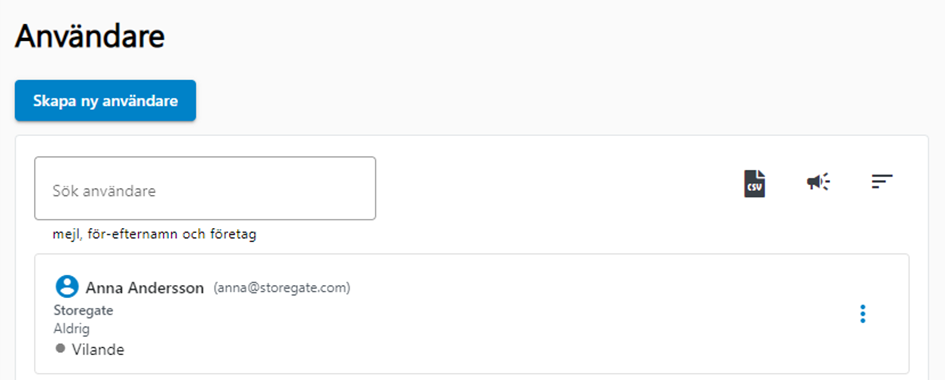
If you have created users that are dormant in Storegate, you can wake them up together or separately. Log in as administrator/sub-administrator and go to Account/Users. Here you can see the status of the user and choose to wake all or one user.
Back to Collaborate and manage users